Cura app icon

Cura

Tinder for your camera roll.

AI scans your library and finds the junk. Duplicates, blurry shots, old screenshots. Swipe left to delete, right to keep. Free up gigabytes of storage in minutes.

Download on the App Store
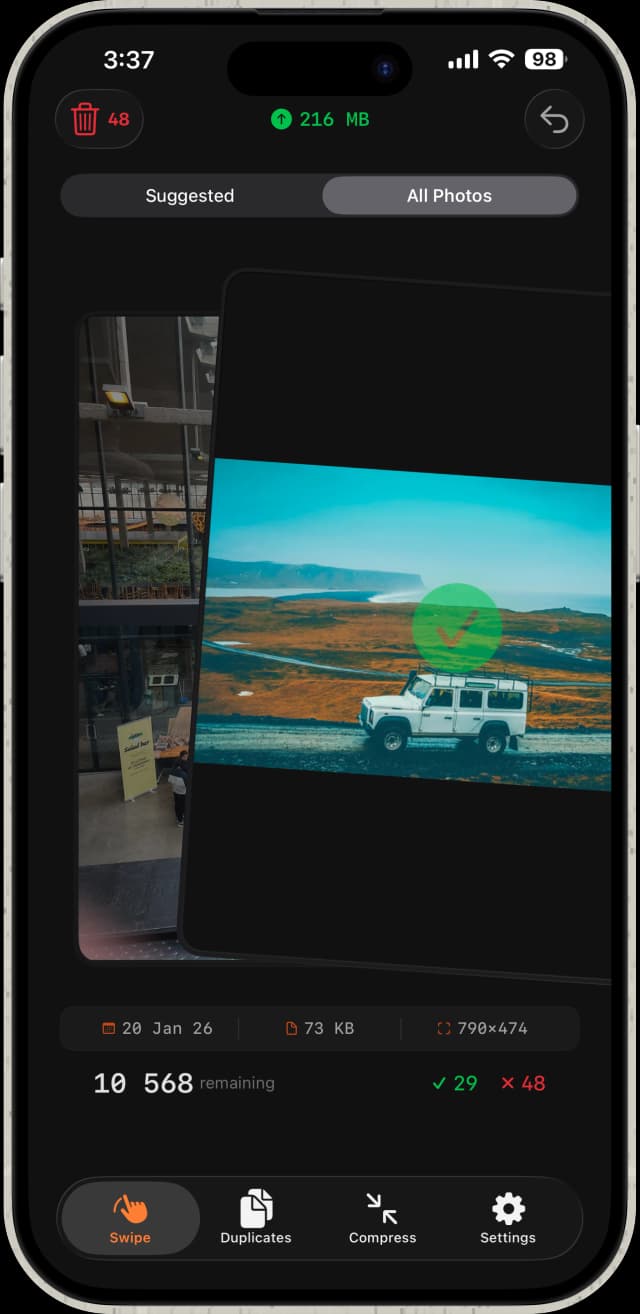
Cura app screenshot showing photo cleanup interface

Thousands of photos
you'll never look at again.

Eating your storage.
Costing you iCloud.

Who has time to scroll through all of them?
Cura does it for you in minutes.

How it works

1. Scan

AI analyzes your entire photo library on-device. Duplicates, similar shots, blurry photos, and old screenshots surfaced in seconds.

2. Swipe

Left to delete, right to keep. Each swipe takes half a second. You'll clean up hundreds of photos before your coffee gets cold.

3. Clean

One tap to bulk-delete everything you rejected. Free up gigabytes of phone storage instantly.

It knows exactly what to surface

On-device AI that actually understands which photos are worth keeping.

Duplicate Detection

Finds exact and near-identical photos, even burst shots. Compare them side by side, keep the sharpest, delete the rest.

Similar Photo Groups

Automatically groups similar shots from the same moment. The AI picks the best one so you don't have to compare them yourself.

Blurry Photo Finder

Spots blurry and out-of-focus photos you forgot to retake. No more squinting to tell the difference.

Screenshot Cleanup

That address you screenshotted in 2022? Gone. Surfaces old screenshots so you can purge them fast.

Video Compression

Shrink 4K videos by up to 80% with no visible quality loss. The biggest storage win on your phone.

Photo Compression

Convert JPEG photos to HEIC format. Same visual quality, up to 50% smaller file size. Reclaim storage without losing a single photo.

100% on-device.

Your photos never leave your phone.

No cloud uploads. No accounts. No servers. Every scan runs entirely on your iPhone using on-device AI. Your photos are never seen by anyone but you.

Choose your plan

Weekly

$2.99

/week

Try it out. Cancel anytime.

Best Value

Lifetime

$38.99

one-time

Pay once, keep it forever. Every future update included.

Annual

$21.99

/year

Full access for a year. Renews automatically.

All plans unlock unlimited photo cleanup, video compression, photo compression, and advanced duplicate detection.

Questions? Answered.

How does Cura find duplicate photos?

Cura uses on-device AI (Apple's Vision framework) to compare visual similarity across your entire photo library. It catches exact duplicates and near-identical shots like burst photos or slight angle changes, then groups them so you can keep the best one and delete the rest.

Will Cura delete my photos without asking?

Never. You are always in control. Cura shows you which photos it found and you swipe to decide: right to keep, left to mark for deletion. Nothing is deleted until you tap the bulk-delete button. Deleted photos still go to your Recently Deleted album for 30 days.

How much storage can I free up?

Most people have 30% or more junk in their camera roll: duplicates, blurry shots, and old screenshots. That can add up to 5-15 GB depending on your library size. Video compression can save even more by shrinking 4K videos by up to 80%.

Does Cura upload my photos anywhere?

No. Everything runs 100% on your device. Your photos never leave your iPhone. No cloud uploads, no accounts, no servers. Cura cannot see or access your photos outside the app.

What is the difference between the plans?

All plans unlock the same features: unlimited photo cleanup, video compression, photo compression, and advanced duplicate detection. The only difference is billing: weekly ($2.99/week), annual ($21.99/year), or lifetime ($38.99 one-time, no recurring charges).

Does video compression reduce quality?

Video compression uses modern codecs like HEVC to shrink file sizes by up to 80% with no visible quality loss. You can preview the compressed version before replacing the original, so you always stay in control.